

Disclaimer: Not endorsed by, affiliated with, or sponsored by Ivanti. This is a product review of the Ivanti Service Manger product.
Category: Ivanti Service Manager

a19 Mobile Apps
Disclaimer: Not endorsed by, affiliated with, or sponsored by Ivanti. The a19 Mobile Apps are independent apps that can be used with any ITSM or CRM product. Ivanti Neurons, Ivanti Service Manager, and Ivanti Asset Manager is what we have experience with and the ITSM / ITAM products we prefer over ServiceNow

UAT Test Script Case Example
One of the biggest issues with writing UAT test cases, is knowing where to start and insisting on using the software. The fact is, you do not need access to Ivanti Service Manager (ISM, powered by HEAT IT Service Management) and in fact it is encouraged not to use ISM at all when devising UAT Test Scripts.

Software Asset Management 101
Software asset management (SAM) is a business practice that involves managing and optimizing the purchase, deployment, maintenance, utilization, and disposal of software applications within an organization. Ivanti Asset Manager Ivanti Asset Manager (IAM) is a much talked about “new” product that was released with ITxM 2018.3 and actively promoted with ITxM 2019.1. ITxM 2019 in fact consists of Ivanti Service Manager (ISM) … Continue reading Software Asset Management 101

WHAT IS ISM BLACKOUT?
Blackout, is a point in time in the development process when a system becomes unavailable (off-line) by design. The term comes from Electricity “blackouts” when there is a complete electric shut down.
What is ISM Brownout?
Code Freeze, aka Brownout, is a point in time in the development process after which any and all configuration changes must be coordinated with the lead consultant to mitigate risk of conflicting changes and new defects.

Best Practice – List Styles
A best practice that you can find throughout the a19 Consulting Best Practice system is to use color coding where possible, especially with lists, so it is visually easy and quick to identify important records or columns, such as the Status, Start Date, End Date, and Owner of Project Tasks by using style expressions. Why the owner? For a meaningful project overview of project tasks.
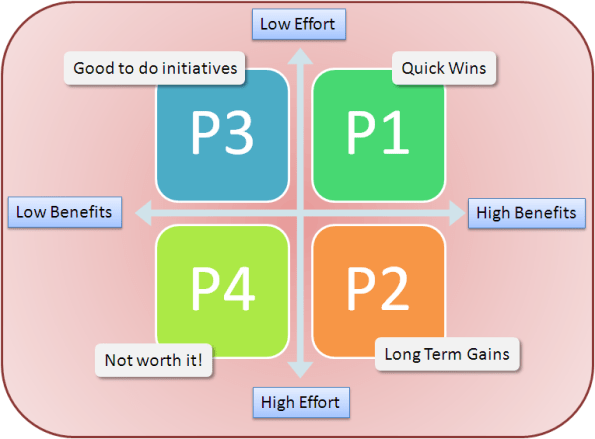
Scope of Work Priorities
When you are gathering Ivanti Service Manager (ISM) and Ivanti Asset Manager (IAM) requirements to build your Solution Design Documentation and Scope of Work (SOW) there is one very important best practice. Set Implementation Priorities!

Ivanti Service Manager Upgrades
Before you consider upgrading your on premise Ivanti Service Manager (ISM) and/or Ivanti Asset Manager (IAM) you should consider the What's New Releases, the Ivanti Release Schedule, Steps Involved, and Impact to your Service Desk Implementation.

Security Sessions History
Security sessions are derived from the security history business object (Frs_ops_logon_history) and used the status value and logout time to determine "security session" by event type and login type. An advanced workaround would be to create a summarized table similar to the a19 Consulting Best Practice System's implementation.


 ITSM/ITAM/ESM Blog
You must be logged in to post a comment.