
Without fail almost every customer, in every part of the word, UK, EU, Australia, Canada, US is annoyed with the overwhelming number of Saved Searches, especially for the main business objects like Incident, Service Request.

Without fail almost every customer, in every part of the word, UK, EU, Australia, Canada, US is annoyed with the overwhelming number of Saved Searches, especially for the main business objects like Incident, Service Request.
Recently one of my clients in the UK had an issue where they needed to reset a number of internal HEAT user passwords using the Service Desk Manager role.

The calendar workspace scope isn't documented but here it is, a UI Quick Action for Ivanti Service Manager
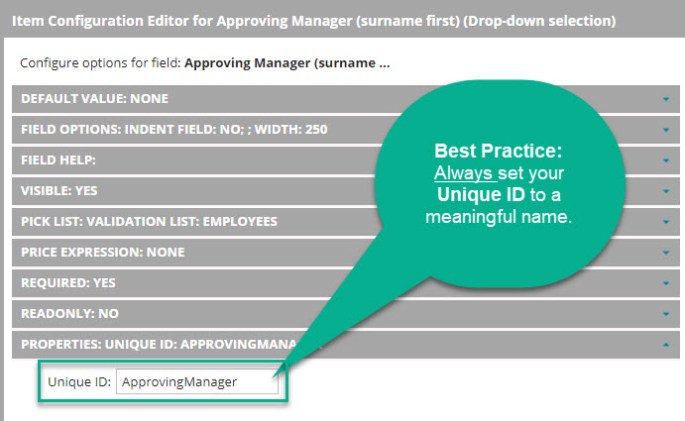
Unique ID plays a critical HEAT Design & Architecture Role. Parameter Name is used for searches, filters, and reporting for Service Requests

How do you generate barcodes? It's a little tricky with Ivanti Service Manager

connection attempt fails with error: 40 - Could not open a connection to SQL Server
DISCLAIMER: Not endorsed by, affiliated with, or sponsored by Ivanti, ServiceNow, Remedy, Infor, or Sage. Any use of the software product names is descriptive of the fact that I have experience with the above-mentioned ITSM and CRM products. "Ivanti Consultant" refers to job description, experience, and skill set
Disclaimer: Not endorsed by, affiliated with, or sponsored by Ivanti. This is a product review.

One of the HEAT Classic Features that is frequently requested is to bring back the customer history. There are several implementations for this, yesterday covered how to implement Incident Customer History for Related Items, aka Object Matching, today we will cover how to show Customer History using a Quick Action. Create a UI Quick Action for IncidentScope: ObjectWorkspaceCommand ID: SearchConfirmation: … Continue reading How to show Customer History using Quick Action
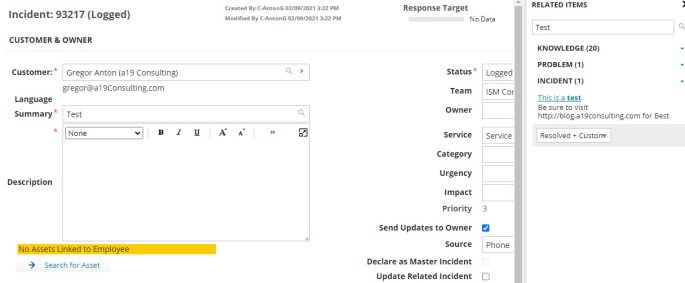
One of the HEAT Classic Features that is frequently requested is to bring back the customer history. There are several implementations for this, today we will cover how to implement Incident Customer History for Related Items, aka Object Matching.
IT Chronicles ITSM Articles


 ITSM/ITAM/ESM Blog
You must be logged in to post a comment.